

Download Android Sync Manager WiFi – Wireless PC‑Mobile Sync, File Transfer & Backup Tool
What Is Android Sync Manager WiFi?
Android Sync Manager WiFi is a lightweight, free utility that lets you connect your Android smartphone or tablet to a Windows PC without the need for USB cables, Bluetooth adapters, or third‑party cloud services. By leveraging a simple Wi‑Fi network—whether it’s your home router or a direct hotspot—the app creates a secure, bidirectional bridge between the two devices. Once the bridge is established, you can transfer photos, videos, music, documents, contacts, messages, and even entire application packages with a few taps. The tool also includes a built‑in backup module that captures your apps, settings, and personal data, making it an ideal companion when you’re switching to a new phone or need to safeguard critical information before a factory reset.
The core appeal of Android Sync Manager WiFi lies in its frictionless workflow. After installing the companion desktop client on Windows, you launch the Android app, scan a QR code or enter a short PIN, and the two devices instantly recognize each other. From there, the interface offers a familiar file‑explorer view, allowing you to drag‑and‑drop files, queue multiple transfers, or schedule automatic backups. Because the data never leaves your local network, the process remains fast, private, and free from data‑usage caps that often accompany cloud‑based alternatives. Whether you’re a photographer needing quick access to high‑resolution images, a developer moving APKs, or a casual user syncing music playlists, Android Sync Manager WiFi provides a secure, cable‑free solution that works on virtually any modern Android device.
Key Features That Set Android Sync Manager WiFi Apart
- Wireless File Transfer – Move any file type between Android and Windows over Wi‑Fi with speeds comparable to local Ethernet.
- One‑Tap Sync – Use QR code or PIN pairing for instant connection without manual IP configuration.
- Full Backup & Restore – Save apps, contacts, messages, and system settings to your PC, then restore them on a new device.
- Selective Sync – Choose specific folders or file types to sync, reducing unnecessary data traffic.
- Batch Transfer – Queue multiple files or whole folders for simultaneous upload or download.
- Secure Encryption – All data is encrypted with TLS during transit, ensuring privacy on shared networks.
- Cross‑Platform Desktop Client – Native Windows application with a clean UI that mirrors the Android side.
- Automatic Update Alerts – The app checks for new releases and prompts you to download the latest security patches.
- Low Battery Impact – Optimized background processes keep power consumption minimal during long sync sessions.
- Free & Ad‑Free – No hidden fees, no ads, and no mandatory cloud subscriptions.
Each feature has been designed with everyday usability in mind. For example, the QR‑code pairing eliminates the need to remember IP addresses, which can be a stumbling block for less‑technical users. The selective sync option is especially useful when you only want to back up contacts and messages while leaving large video files on the device. Moreover, the built‑in encryption guarantees that even if you’re on a public Wi‑Fi hotspot, your data remains protected from eavesdropping. The combination of a free, ad‑free model and robust security makes Android Sync Manager WiFi a compelling alternative to premium solutions that charge per gigabyte or require a subscription.
How to Install and Use Android Sync Manager WiFi on Windows and Android
Step‑by‑Step Installation on Windows
1. Download the desktop client from the official website or a trusted app repository. The installer is a small .exe file (approximately 12 MB) that works on Windows 10, 11, and even older Windows 7 systems.
2.
Run the installer and follow the on‑screen prompts. The setup creates a shortcut on your desktop and adds a background service that listens for incoming connections.
3. Allow firewall access when prompted.
The application needs permission to communicate over your local network; you can safely grant this as the program uses encrypted ports only.
4. Launch the client. You’ll see a QR code and a short numeric PIN displayed on the main window.
Keep this window open; it acts as the hub for all sync activities.
Installing the Android App
1. Open the Google Play Store on your device and search for “Android Sync Manager WiFi.”
2. Tap Install.
The app size is under 10 MB and requires Android 5.0 (Lollipop) or newer.
3. After installation, open the app and grant the necessary permissions: storage access, location (required for Wi‑Fi scanning), and optionally battery optimization exemption for uninterrupted background syncing.
4. The app will automatically detect the Windows client on the same Wi‑Fi network and display the QR code for pairing.
Connecting Your Devices
With both sides ready, you have two simple pairing options:
- QR‑Code Scan: Use the Android app’s built‑in scanner to capture the QR code shown on the Windows client. The connection is established within seconds.
- PIN Entry: If you prefer a manual method, type the numeric PIN displayed on the desktop into the Android app’s “Enter PIN” field.
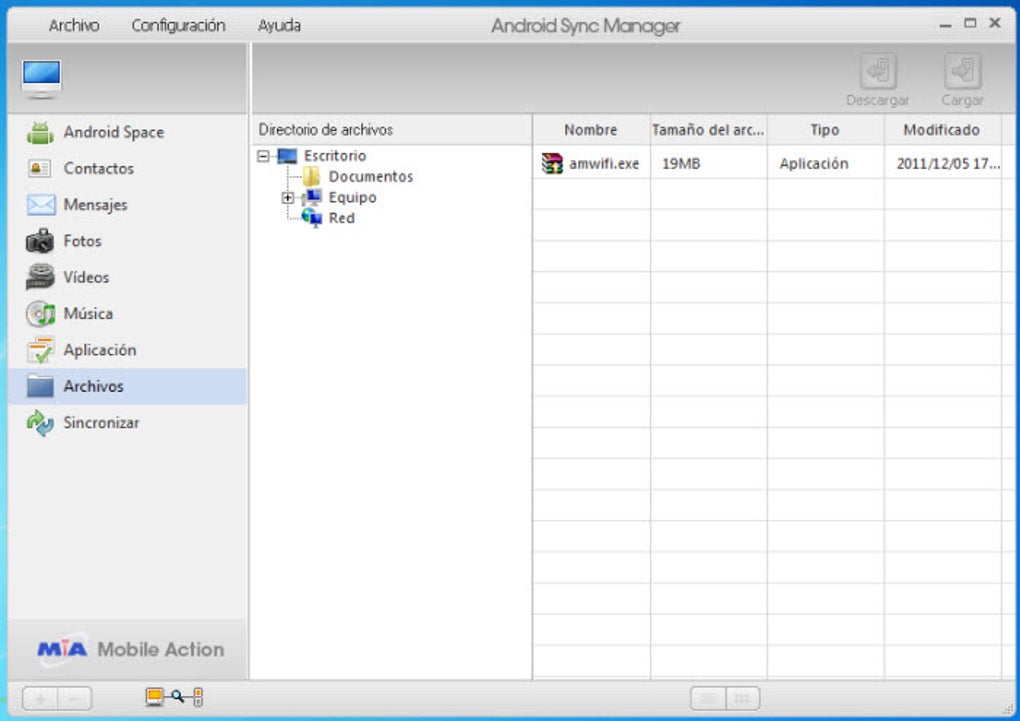
Once paired, the main interface shows two panels: the left panel lists your Android files, and the right panel shows your PC directories. Drag files from one side to the other, or use the “Sync” button to copy entire folders. The app also offers a “Backup Now” shortcut that instantly creates a compressed archive of selected apps and settings on your PC.
Android Sync Manager WiFi is compatible with Windows 7/8/10/11 (32‑bit and 64‑bit) and Android 5.0+ devices, including smartphones, tablets, and even Android‑based TV boxes that support Wi‑Fi connectivity.
Pros and Cons – A Balanced Look at Android Sync Manager WiFi
Advantages
- No Cables or Bluetooth Required – Eliminates the hassle of tangled cords and unreliable Bluetooth pairing.
- Fast Local Transfers – Utilizes Wi‑Fi bandwidth for rapid file movement, often exceeding 30 MB/s on a typical home network.
- Comprehensive Backup – Saves apps, contacts, messages, and settings, making device migration painless.
- Secure Transmission – TLS encryption protects data from interception on public networks.
- Free and Ad‑Free – Provides a premium experience without subscription fees.
Drawbacks
- Windows‑Only Desktop Client – macOS and Linux users need to find alternative tools.
- Requires Same Wi‑Fi Network – Devices must be on the same LAN; remote sync over the internet is not supported.
- Limited Automation – No built‑in scheduling for recurring backups; you must initiate each session manually.
Frequently Asked Questions
Is Android Sync Manager WiFi completely free?
Yes, the app is free to download and use on both Android and Windows. There are no hidden subscription fees or in‑app purchases, and the experience remains ad‑free.
Can I sync files over a mobile hotspot?
Absolutely. As long as both the PC and Android device are connected to the same hotspot network, the app will detect each other and allow transfers.
What types of data can I back up?
You can back up contacts, SMS/MMS messages, call logs, installed APK files, app data (when permitted), photos, videos, music, and even system settings.
Is the transfer encrypted?
Yes. All data exchanged between the Android device and the Windows client is protected with TLS encryption, ensuring privacy even on unsecured networks.
Do I need to keep the app open during a transfer?
Both the Android app and the Windows client must remain open while a transfer is in progress. Once the sync completes, you can safely close the applications.
Final Verdict – Should You Download Android Sync Manager WiFi?
If you’re looking for a reliable, free solution to move files, back up data, and keep your Android device in sync with a Windows PC, Android Sync Manager WiFi delivers a solid combination of speed, security, and simplicity. The QR‑code pairing removes the technical barrier that often discourages users from trying wireless sync tools, while the comprehensive backup feature adds genuine value for anyone planning a device upgrade. Although macOS and Linux support are currently missing, the Windows‑only desktop client is lightweight and runs smoothly on older hardware, making it accessible to a broad audience.
In today’s ecosystem of cloud‑centric services, having a local, cable‑free alternative can save bandwidth, protect privacy, and accelerate large‑file transfers. Android Sync Manager WiFi does exactly that without charging a dime or bombarding you with ads. For power users, developers, photographers, or anyone who simply wants to avoid the hassle of USB cables, the app is a worthwhile addition to your toolkit.
Ready to experience seamless wireless syncing? Click the download button below to get the Windows client, install the Android app from the Play Store, and start transferring files instantly. Your next device migration will feel effortless—no cables required.
Pros: Fast wireless transfers, full backup, secure encryption, free & ad‑free.
Cons: Windows‑only desktop client, no remote sync, manual backup initiation.







